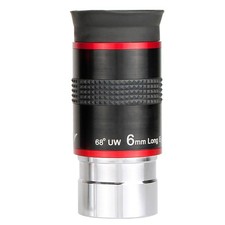
Vortex Diamondback Magnetic Digiscope Adapter | Camera & Photo
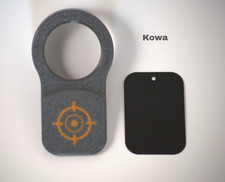
This Vortex Diamondback magnetic digiscope adapter is listed as new and designed to help you align a compatible phone or camera for digiscoping through your optics. It fits within the Cameras & Photo category and is intended for quick attachment and removal in the field. Check the listing for details on exact compatibility, included parts, and setup requirements. Price shown is $24.99 USD, and it ships with free shipping. Review the listing photos and notes for the most accurate information on what you will receive.

| Location | Willard US |
| Shipping | Free shipping (check listing for details) |
| Seller |
melfra_3912
100.0% positive · 120 feedback
|
| Listing | FixedPrice · Active |
| Start time | 2025-07-23T14:47:28.000Z |
| Select Model | 08-Vortex Diamondback 65/85 Generation 2 |
| Compatible Brand | For Vortex |
| Size | 4"x2" |
| Color | Dark Grey and Orange |
| Material | Rigid Plastic |
| Item Length | 4" |
| To Fit | Spotting Scopes |
| Brand | OnPoint |
| Type | Digiscope Adapter |
| Item Height | 1" |
| Compatible Series | Diamondback |
| Country/Region of Manufacture | United States |
| Unit Quantity | Each |
| Item Weight | 1.6 oz |
| Item Width | 2" |
Custom designed digiscope adapter made from high quality 3D printed materials with built in powerful magnets. At less than 2 oz it is lightweight and perfect to throw in a pack or pocket. Easy to use with a thin metal plate (included) attached to your phone, between your phone/case, or attached to your case. Take all your spotting scope needs to a new level with crisp photos and videos. Custom designed to securely slip on to your scope with no need for screws, clamps, etc. Easy to take on and off during use. (Phone and spotting scope not included)***Please note: Each scope eyepiece is a different measurement please choose the correct scope from the models listed.Weight: 1.6 ozColor: Grey and OrangeSize: 4 ¼” L x 2 3/8” W x 1” HInstructions for Use:Attaching the plate:Turn your phone camera on and align the camera to best condition with the center of the scope. Note the position of the magnets relative to the phone case to determine where to attach the steel plate.Remove the backing from the steel plate, and attach the plate at the predetermined position on the back of the phone, inside the case, or to the back of the case.Using the adapterMake sure automatic macro is not enabled on your phone's camera to force the focal point to the correct location. Many iphones have auto macro settings that must be turned off.Place digiscope adapter on eye piece of scope. Make sure it is pushed all the way on. Orient the magnets to your preferred orientation for attaching the phone.Turn on camera of the phoneHold the phone about 1” or so from the digiscope until you can see the light circle from the scope on your phone screen. Hold the light circle at the center of the camera and slowly move the phone towards the adapter until the magnets engage the plate and secure the phone. Adjust the zoom on your phone to achieve the desired image, and take pictures/videos as needed.For some scopes, the eye relief will move in and out depending on the zoom level. To achieve the best image, remove the adapter, adjust the eyepiece in or out to adjust spacing of the phone from the scope. Reinstall the adapter and adjust as requiredIf you are having issues with your camera switching lenses in the middle of use, consider downloading digiscope apps to help with that.